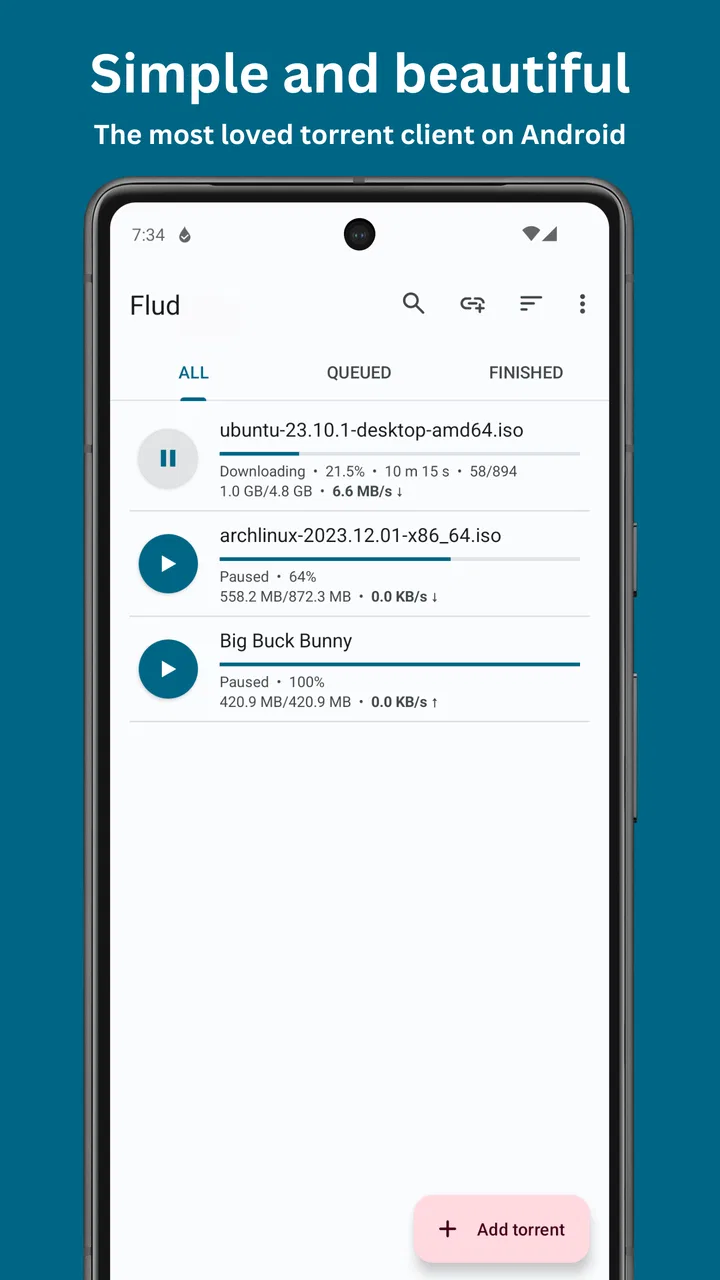
Flud - Torrent Downloader
- 4.6
- Rating
- 10.00M
- Installs
- Free
- Price

 Analysis by App-foxy
Flud - Torrent Downloader is the kind of Android app I would recommend to someone who wants a direct way to manage torrent downloads without turning the process into a desktop-style project. I found its appeal in the simple idea behind it: choose a torrent or magnet link, decide where the files should go, and let the app handle the transfer. It belongs to the video players and editors category, although its practical role is closer to a mobile torrent manager than a conventional video player.
That distinction matters because the app is most useful before you watch anything. It can help bring large media files onto an Android device, but it does not replace a dedicated media library or an editor. In my experience, the best results come when I treat it as one part of a larger workflow: download responsibly, check the destination, wait for the transfer to complete, and then open the finished file with the player I normally use.
Where Flud usually feels difficult at first
The first point of friction is understanding what the app is actually waiting for. Flud does not magically find content for you. You need a torrent file or a magnet link from a source you trust and have the right to use. A new user may install it, see an empty list, and assume something is broken. In reality, the app is ready for a task; it simply needs the task supplied.
You May Also Like

 Blood Strike: 2.5 Anniversary
Blood Strike’s Loadouts Turn Every Drop Into a Tactical Gamble
A close look at Blood Strike’s custom loadouts: how fast access to signature weapons reshapes its battle royale rhythm, rewards preparation, and narrows the gap between fights.

 Pandora - Music & Podcasts
Pandora’s Music Is Easy to Start, but Harder to Recover
Pandora’s strength is its low-effort path from a seed to a station. Its weak spot is how much confidence it asks you to place in connection, setup, and quiet recovery.

 8 Ball Pool
 Is Built on Rivalries, Rematches, and Routine
A close look at the rivalries, rematches, shared routines, and unanswered safety questions that turn a quick pool match into a persistent mobile community.

 Samsung Music
’s Quiet Strength Is Playing What You Already Own
Its reach comes less from spectacle than from dependable access to a personal library. That simplicity is both the app’s strongest retention engine and its ceiling.

 AccuWeather: Weather Radar
AccuWeather Review: A Quick, Clear Forecast for Everyday Decisions
For everyday plans, the best forecast is the one you can understand quickly. AccuWeather makes rain timing, radar, and local conditions easy to act on, with a few trade-offs.

 Hill Climb Racing
Why Hill Climb Racing Still Turns Crashes Into One More Run
A tiny car, a bumpy hill and one more upgrade: Hill Climb Racing keeps resurfacing because its simple chaos makes every near-miss feel personal.
More From Our News Desk



Magnet links can also be confusing because they often begin in a browser or another app. The useful habit is to tap the link and check whether Android offers Flud as an option. If the handoff does not happen, copying the link and using Flud’s add function is usually more practical than repeatedly tapping the original page. This small change avoids a common loop where the browser opens the link but never sends it to the downloader.
Another stumbling block is file selection. A torrent may contain several folders, subtitles, artwork files, or multiple versions of the same video. Starting the entire package without looking at its contents can waste storage and bandwidth. I prefer to inspect the list first and select only what I really need. That is especially helpful on a phone, where available space disappears quickly and moving a large folder later can be inconvenient.
The app is free, and its store presentation describes it as fully featured without limits. That makes it attractive for regular use, but “no limits” should not be mistaken for unlimited phone resources. The device still has finite storage, the network still has a real upload and download capacity, and Android may restrict background activity to protect battery life. Flud can manage a transfer; it cannot remove those practical limits.
One detail I would not overlook is the destination folder. If I leave downloads scattered across default locations, finding completed files later becomes unnecessarily difficult. I get a cleaner result by choosing one dedicated folder for completed downloads and another temporary location when the app allows that workflow. Even without changing many settings, deciding on a consistent location makes the app feel much more dependable.
What I check before starting a transfer
Before adding anything, I check the file name, the total size, the included folders, and whether the source looks legitimate. This is not just tidiness. A torrent can contain unwanted extras, misleading names, or files that are not what the title suggests. Flud can download the selected content, but it cannot judge whether the content is accurate, safe, or legally available.
I also check the phone’s free storage rather than relying on a rough guess. A download may need room for the incoming files as well as temporary pieces and the final arrangement. If the device is nearly full, the transfer may stop late in the process, which is far more frustrating than discovering the problem before starting.
Network choice matters too. A stable Wi-Fi connection is usually the sensible option for a large transfer. Mobile data can work for smaller jobs, but an accidental background download can consume a plan faster than expected. I make the connection decision before pressing start, not after noticing that the progress has moved further than intended.
Flud is also better suited to users who understand the difference between downloading and streaming. A torrent transfer is not the same as pressing play on a cloud video service. The file may need to finish, or at least progress sufficiently for a compatible playback method, and the experience depends on peers, connection quality, and the file itself. If I need instant viewing with no file management, a normal streaming service is a better fit.
Small setup choices that prevent larger problems
I recommend starting with one modest transfer rather than filling the queue immediately. This gives me a chance to confirm that the destination is correct, the network behaves as expected, and Android allows the app to continue working when the screen is off. Once that first download completes properly, adding more items becomes much less risky.
Queue management is another useful habit. Several active transfers compete for the same connection and can make each one appear slow. If one file matters most, I give it priority by pausing less urgent jobs. This is more effective than assuming the app is underperforming. A crowded queue often creates the impression of a problem when the real issue is divided bandwidth.
I also avoid opening a finished video immediately if the file is still being written or if the transfer has only partially completed. Some players may show an incomplete file, refuse to open it, or stop at an unexpected point. Waiting for completion and then opening the final file from its saved location produces a much cleaner handoff to the media player.
For privacy and safety, I keep the source choice separate from the app itself. A reputable downloader cannot make an unknown torrent trustworthy. I avoid suspicious pages, unexpected executable files, and packages that contain more than the advertised media. This is one of the most important practical distinctions: Flud is a tool for handling a transfer, not a guarantee about the material being transferred.
Recovering a workflow when a download stalls
When a transfer appears stuck, I do not immediately delete it. First I look at whether any progress is occurring and whether the problem affects one torrent or every torrent. If only one item is stalled, the source may have few active peers or no useful availability at that moment. Restarting the app repeatedly will not create missing sources.
If every transfer stops, I check the basics in order: the network connection, available storage, Android’s background restrictions, and whether the app is paused. This simple sequence prevents random troubleshooting. There is little value in changing advanced choices when the phone has lost Wi-Fi or the destination folder can no longer accept files.
Pausing and resuming can be useful after a temporary connection interruption. I prefer that to removing the task and adding it again, because deleting it may also remove the local progress information. If the app has been force-closed or the phone has restarted, I give it a moment to rebuild its list before assuming the download has vanished.
A stalled transfer can also be caused by the torrent itself. Some torrents are popular when first published and become inactive later. Others may have incomplete availability even though the listing looks appealing. In those cases, Flud is not failing to download a healthy source; it is accurately reflecting the lack of usable pieces. Trying a legitimate, better-supported source is more sensible than endlessly changing phone settings.
Storage errors deserve special attention because they can look like network failures. If the progress stops near the end, I inspect the destination and confirm that the phone still has room. I also check whether the selected folder is accessible and whether the device has changed its storage state. Moving or deleting unrelated files, then restarting the transfer, may solve the issue without rebuilding the entire job.
How I handle interrupted downloads
My preferred recovery method is conservative. I leave the existing task in place, confirm the connection, and resume it. If progress returns, I let it continue rather than making several changes at once. This makes it clear which action helped and reduces the chance of losing the partial download.
If a task repeatedly fails while other torrents work normally, I inspect its contents and source rather than blaming the application. A malformed torrent, unavailable pieces, or an inaccessible destination can all produce similar symptoms. The useful question is not simply “why is Flud slow?” but “does this specific task have anything available to download, and can the phone save it?”
For large files, patience is part of the workflow. Speed can vary as peers join or leave, and a transfer that looks inactive may resume later. I avoid judging performance from a short snapshot. At the same time, I do not leave a failing job running forever if storage is being consumed or the source repeatedly proves unusable. Removing a clearly bad task and starting again from a trusted source is sometimes the cleanest solution.
Once a file finishes, I verify it before deleting the torrent task. I check that the file opens, that the size looks plausible, and that the intended folder contains the expected material. This extra moment protects against the common mistake of cleaning up the task list before confirming that the final file is usable.
When the app is not the cause
Android power management is often the hidden variable. Phones may limit background activity when the screen is off, especially if the app is not allowed to operate freely in the background. The exact menus differ between manufacturers, so I look for the system’s battery or background-use controls and make sure Flud is not being aggressively restricted. I change only what is necessary, since unrestricted background activity can affect battery life.
Network equipment can create another false diagnosis. A weak signal, a congested router, or a connection that frequently changes can interrupt transfers even when ordinary web pages still load. Browsing is not a perfect test because a page can load quickly while a long-running torrent struggles with sustained connectivity. Testing the same task on a stable network gives a more meaningful comparison.
Storage permissions and folder access can also be involved, particularly after changing the destination or using removable storage. If Flud can list a task but cannot write the result, I revisit the selected location and Android’s access prompt instead of repeatedly restarting the download. A simpler internal folder may be a useful diagnostic step before trying a more complicated storage arrangement.
Security software, data-saving modes, and router rules may interfere as well. I do not recommend disabling protections casually. Instead, I identify whether the problem begins only on one network or after one system setting changes. That approach keeps troubleshooting safe and avoids turning a download problem into a broader device-security problem.
It is also important to separate playback problems from download problems. If the file is complete but the video will not open, the issue may be the format, codec, damaged file, or the player being used afterward. Flud’s job ended when the file was saved. I test the file with a capable media player and compare it with another known-good video before concluding that the download itself failed.
Who will appreciate Flud, and who should choose something else
I see Flud as a good match for Android users who want control over torrent tasks, file destinations, and download timing. It is particularly useful when I need to keep a file locally for offline use and do not want to depend on a desktop computer. The app’s long presence since its release in August 2013 and its current version, 2.0.15, also make it feel like an established tool rather than a short-lived experiment.
Its audience is reflected in its broad adoption: the app has passed ten million installs, with an average rating of 4.6 from around 451 thousand ratings and about thirteen thousand written reviews. Those figures do not replace personal testing, but they suggest that the basic workflow has worked for a substantial Android audience. The Everyone age rating also makes the interface approachable, although responsible use still depends on the user and the source.
I would skip it if my main goal were instant streaming, automatic cloud synchronization, or polished video editing. A streaming app removes file-management decisions, a cloud service is better for accessing the same library across devices, and an editor is designed for trimming and producing videos. Flud is strongest when the user accepts that downloading is a separate step and wants hands-on control over it.
Compared with a desktop torrent client, the advantage is convenience: I can manage a transfer directly on the phone without moving a file through another device. The trade-off is that a phone has less storage, more aggressive background management, and usually less room for complex long-running workflows. Compared with a basic mobile downloader, Flud is more appropriate when the source is a torrent or magnet link rather than a single direct file.
My practical verdict after using it
Flud - Torrent Downloader earns a place on my Android device when I need a focused torrent workflow and I am prepared to manage the surrounding details responsibly. I like that it does not force me into a complicated desktop routine, and I find the most reliable experience comes from careful source selection, a deliberate destination folder, and a small test download before building a queue.
The main weakness is not that the app is difficult in every situation; it is that torrent downloading exposes several problems outside the app’s control. Missing peers, restricted background activity, limited storage, unstable Wi-Fi, and incompatible video files can all look like one vague failure. Users who understand those boundaries will get much more from it than someone expecting a one-tap streaming experience.
For an everyday example, I might add a legally shared video collection while connected to home Wi-Fi, select only the folders I need, save them to a known media directory, pause other transfers, and verify the finished files before cleaning up. That workflow takes a little thought, but it avoids the most common frustrations and makes the app feel predictable.
Delphi softwares has kept the product focused on its core purpose, and the free price removes the usual barrier to trying it. I would recommend it to a user who wants a capable mobile torrent manager and is willing to learn a few storage and network habits. I would not recommend it to someone who simply wants to press play immediately. For the right user, its biggest strength is practical control; for everyone else, a conventional streaming or cloud app will probably be easier.
FAQs for Flud - Torrent Downloader
01What is Flud – Torrent Downloader used for?
Flud is an Android torrent client that lets you download and share files through the BitTorrent protocol. After opening a torrent file or magnet link, you can choose which files to download, monitor speed and progress, pause or resume transfers, and manage completed downloads. It is designed for users who want direct control over torrent tasks from a mobile device.
02Is Flud – Torrent Downloader free to download and use?
Flud is available as a free application, although the free version may include advertising or optional limitations depending on the edition installed. There may also be a paid, ad-free version available through the app store. Before downloading, check the current listing, pricing, and in-app purchase information for your region, since these details can change over time.
03Does Flud support magnet links and torrent files?
Yes, Flud supports both traditional torrent files and magnet links. You can usually open them from a browser, file manager, messaging application, or another compatible app, then select Flud as the destination. The client also provides options for choosing individual files, setting download locations, and adjusting transfer priorities before or during a download.
04Is downloading torrents with Flud safe and legal?
Flud is simply a tool for transferring files through the BitTorrent network, so legality depends on the content you download and the laws in your country. Downloading or sharing copyrighted material without permission may be illegal. For safer use, download only content you are authorized to access, avoid suspicious torrent sources, and consider using trusted security software and a secure network.
05What permissions and settings does Flud require?
Flud may request access to storage or media files so it can save downloaded content and read torrent files, while notification permissions can help display transfer progress. Depending on your Android version, some permissions are managed through a system file picker rather than granted permanently. It is also worth reviewing battery, background-data, and Wi-Fi settings if downloads stop when the app is not open.
Pros
- Clean
- intuitive interface with quick access to torrent controls.
- Supports magnet links and torrent files for flexible downloading.
- Built-in bandwidth limits help prevent downloads from slowing other apps.
- Can download selected files instead of the entire torrent.
- Offers scheduling options to manage downloads during preferred hours.
Cons
- Free version includes advertising that may feel intrusive to some users.
- Large torrents can consume significant storage without much warning.
- Battery usage may increase during long background downloads.
- Some trackers or torrents may require manual troubleshooting.
- Advanced settings can be overwhelming for first-time torrent users.

Flud - Torrent Downloader
Gallery